How to Change Windows 7 Logon Screen Using Registry? |

| How to Change Windows 7 Logon Screen Using Registry? Posted: 25 Feb 2012 05:27 AM PST
No Third party software utility is needed to change Windows 7 Logon Screen as we do in Windows Xp. I have already explained in detail on How to change Windows Xp Logon screen in, Top 10 ways to Tweak your Windows Xp. Customizing Windows 7 is much easier when compared to earlier versions by doing some Registry hacks. Steps to Change Windows 7 Logon Screen1. Press Windows Key + R to launch Run. Type REGEDIT and hit enter. HKEY_LOCAL_MACHINE\SOFTWARE\Microsoft\Windows\CurrentVersion\Authentication\LogonUI\Background or Alternatively you can download the Registry file from here.Extract the file and double-click on the file to enable this feature (Alternative method: right-click, select Merge). 5. Now place your desired picture inside logon file into C:\Windows\System32\oobe\info\backgrounds. In my Windows 7 I use Alienware themes so changed Windows 7 Logon Screen with Alienware picture. 6. Rename the file to backgrounddefault.jpg. (Please NOTE: Images must be less than 256kb in size). That’s it        |
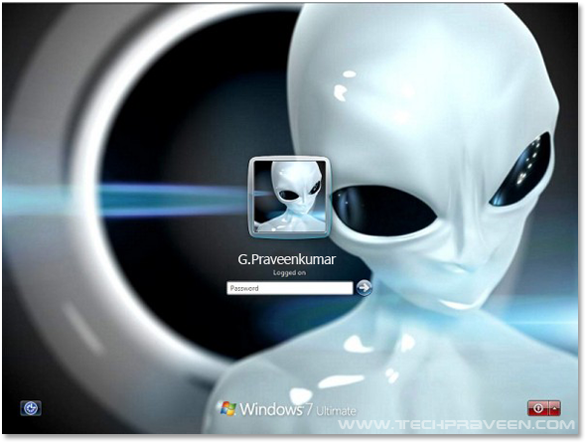
 In this article I will show you how to change Windows 7 Logon Screen using registry hacks in simple steps.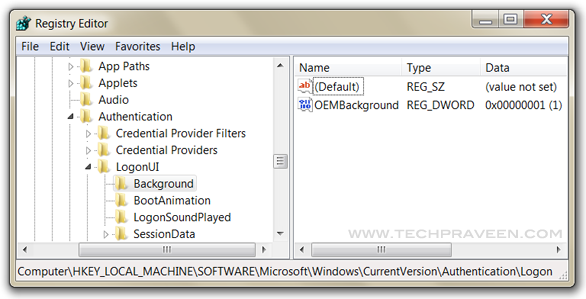


| You are subscribed to email updates from Computer Tips & Tricks To stop receiving these emails, you may unsubscribe now. | Email delivery powered by Google |
| Google Inc., 20 West Kinzie, Chicago IL USA 60610 | |

Niciun comentariu:
Trimiteți un comentariu